You've rewritten your title three times this week, added tags you found in a video, and dropped your price twice. Your views are still flat, and you can't tell which change helped, hurt, or did nothing at all. That's the usual trap with Etsy listing optimization. Sellers edit everything at once, chase the broadest search phrase they can find, then check their ranking once and treat that single result as if it's fixed.
I work the opposite way. I would pick one listing, pick one specific buyer phrase, and fix the blanks before touching anything clever. Then I would change one variable at a time and watch the result over several days. Ranking is a range you observe, not a permanent slot you win. Once you accept that, your edits get calmer, your data gets cleaner, and you stop wasting hours on tactics you can't prove.
Etsy Listing Optimization Checklist at a Glance
Run this table over one listing before you edit a word. It covers every field Etsy reads to match your listing to a search, plus the fields a buyer reads before deciding to click.
Element | What to set | Reference value |
|---|---|---|
Category and attributes | Most specific category, every relevant attribute filled | All relevant attributes completed |
Title | Product type and main phrase near the front, readable as a sentence | 140 characters maximum |
Tags | All 13 tags, multi-word phrases, varied and natural | Up to 20 characters per tag |
First photo | One finished product, accurate color, no collage or text overlay | Sharp and well lit, at least 2,000 × 2,000 px |
Additional photos | Second angle, close-up detail, scale, use in context, each variation | Up to 10 photos per listing |
Description opening | Product, recipient or use, and material in the first two sentences | First 2 sentences carry the facts |
Alt text | Plain description of the item as shown in each photo | One plain descriptive sentence per photo |
Return policy | Set where applicable to the product | Set on every listing where it applies |
Etsy's guide to how its search works names titles, tags, categories, attributes, descriptions, the first photo, reviews, listing quality, and customer and marketplace experience as the signals it weighs, and it recommends listing images of at least 2,000 × 2,000 px. That makes this table a completeness check: every filled field gives Etsy more to match and gives the buyer more reason to trust what they see. A polished title cannot cover for a vague category, empty attributes, or a dim first photo.
How to Run the Check on One Listing
Open one live listing you want to sell more of. Don't start with your whole shop. Go row by row and record what is set, not what you remember setting when you published. Mark each field done, weak, or missing.
Watch for the boring gaps. Sellers remember the tags and skip the attributes, or write three paragraphs of description and never add alt text. Those blanks cost nothing to fix and need no research, tools, or guesswork.
Practical rule: If you can't say what's wrong with a listing yet, don't rewrite it yet. Audit first, edit second.
Your first action is the audit itself, so list every blank or weak field in order, starting with category and attributes. The written audit also becomes your baseline. When you later change a single field and leave the rest untouched, you can check whether that one edit moved your position. Rankings drift day to day within a range, so a result checked once proves little; a written record lets a real pattern show.
How to Pick a Buyer Phrase Worth Targeting
The most popular phrase is often the wrong one. Sellers pick it because it looks big, then wonder why they get impressions from people who never click or buyers who click and leave in five seconds. A broad phrase brings a crowded results page and shoppers who may want ten different products. I'd rather target a narrower phrase that describes the person, the occasion, or the exact thing in the parcel.
Take a simple canvas tote bag. Tote bag could mean a grocery bag, a work bag, a bridesmaid gift, or a fashion item. Canvas tote bag for teacher gift tells you who's buying, why they're buying, and what the photo and description need to prove. It will usually get fewer searches. That's fine. Fewer, better-matched searches beat a pile of visits from people who wanted something else.
Phrase type | Example | Strength | Risk |
|---|---|---|---|
Broad product label | tote bag | High search volume | Crowded results and weak buyer intent |
Recipient or occasion | canvas tote bag for teacher gift | Clear intent that matches a purchase | Lower volume |
Material or style | natural canvas tote bag with zip | Specific matches for filtered shoppers | Can be too narrow if the product changes |
Custom or personalized | personalized canvas tote bag | Matches the 31% of buyers looking for custom items | Only fits listings you can actually personalize |
Intent words aren't decoration. Etsy reported that 31% of buyers looked for something custom or personalized and 29% searched for a gift, in its 2025 annual report filing. That doesn't mean every listing should claim to be a personalized gift. It means words like gift, custom, and personalized match real buying reasons when they're true for your product. If they're not true, don't use them. Mismatched traffic doesn't help you.
Three Checks Before You Commit to a Phrase
Does it describe what arrives: Read the phrase as a buyer. If someone searched those exact words and landed on your listing, would they nod or feel misled? If there's any wobble, the phrase is wrong.
Do your photos and attributes back it up: A teacher gift phrase needs a photo and description that make the gift use obvious. A material phrase needs that material shown close up and selected in attributes.
Is it three or more words: Short phrases are usually too broad to tell you anything useful. A longer phrase gives you a clear test and a clear result.
If you want a structured way to gather candidates before you judge them, work through a proper guide to Etsy keyword research and then bring the shortlist back to these three checks. Don't let any tool pick for you. Tools can surface wording you missed, but they don't know your margins, your variations, or whether you can personalize the item.
End this step with two or three phrases, each with a one-line reason. For example, canvas tote bag for teacher gift because the listing includes a gift card option, or natural canvas tote bag with zip because the zip and fabric are the features buyers ask about. Write the reasons down. Later, when you're tempted to stuff all three into every field, those notes will remind you which phrase is the main bet and which ones are supporting angles.
How to Write a Title and Fill All 13 Tags
Edit in order, because each step sets up the next one. If you write the title before you know your category and phrase, you'll rewrite it again. The tote bag example below shows the full pass on one listing.
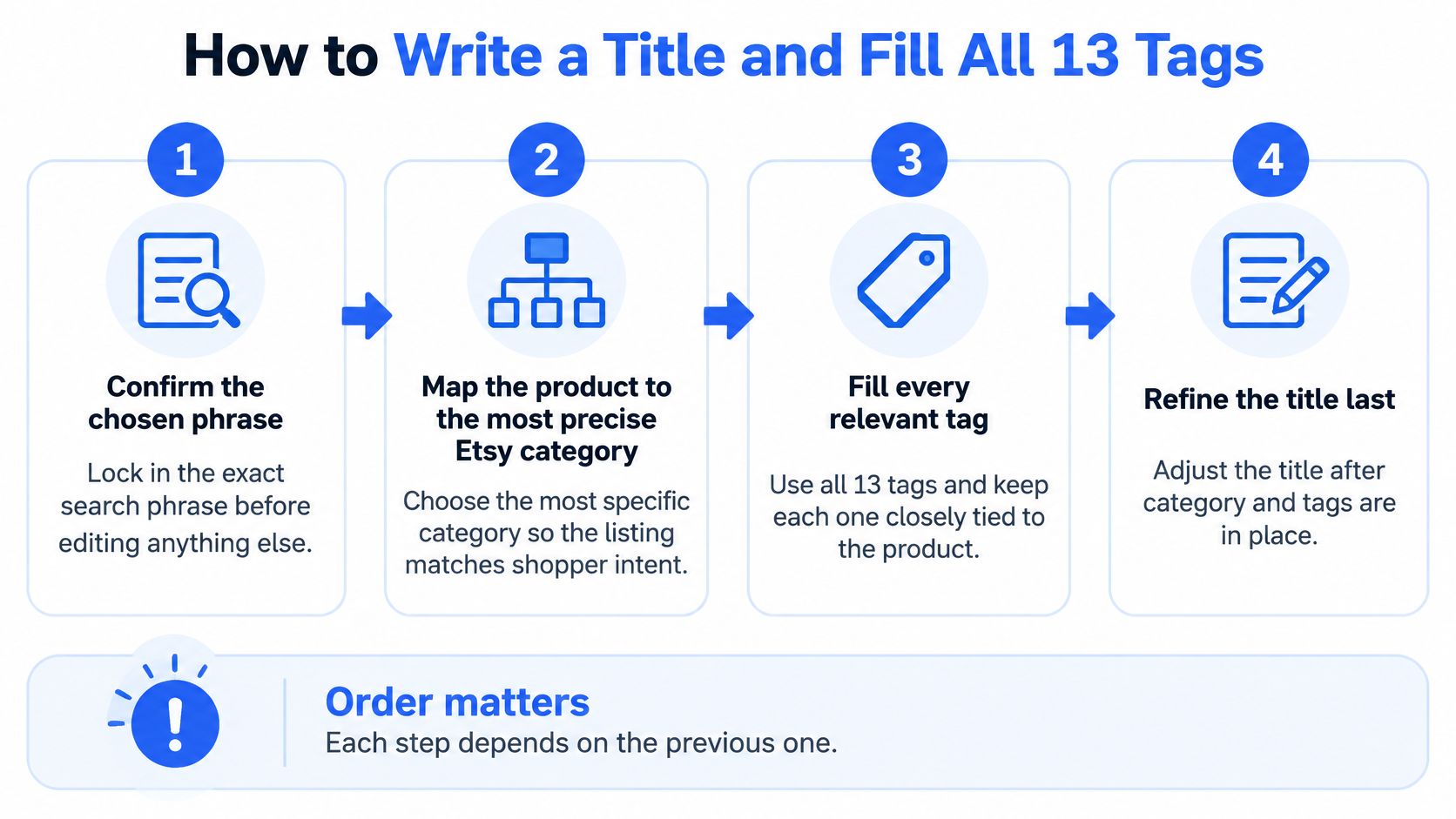
Confirm the phrase and map the category. Lock in canvas tote bag for teacher gift before you touch anything else. Then choose the most precise Etsy category for a tote bag and fill every relevant attribute, including material, color, closure, and personalization options if they apply. Attributes also act as matching signals and help your listing show up when buyers use filters, so treat blank attributes as unfinished work, not optional extras.
Write the title like a person, with the key words up front. Try Canvas Tote Bag for Teacher Gift, Zip Top, Lined Pocket. It's readable, it names the product and recipient first, and it adds two concrete features instead of repeating the word bag four ways. Etsy says title word order does not directly determine ranking, but leading with important terms improves scanability and clicks, according to Etsy's guidance on titles, tags, and search relevance. On a phone screen full of results, the first few words are what a buyer reads.
Fill all 13 tags with varied, natural phrases. Each tag gets up to 20 characters, so plan for short multi-word phrases like teacher gift bag and reusable grocery bag. Cover different true angles across the 13 slots, such as recipient, use, material, style, and occasion. Don't copy your title into the tags and don't spend five tags saying tote bag in slightly different orders. That repetition adds no new information for Etsy or the buyer.
Check that every field tells the same story. Read your title, tags, category, attributes, and the first lines of your description in one pass. They should all describe the same canvas tote, for the same buyer, with the same features. If your title says teacher gift but nothing else mentions teachers, gifts, or cards, you've made a claim the rest of the listing doesn't support. Fix the mismatch now, either by strengthening the listing or by choosing a more honest phrase.
Save the edits on one listing and record what you did. Write down the date, the phrase, and exactly which fields you changed. This note takes two minutes and it's the difference between learning something and guessing later. Don't roll the same rewrite across twenty listings yet. You haven't proven it works.
Review Shop Stats after two to four weeks. Look for tags and search terms that earned impressions but no clicks. Those are your replacement candidates. Swap one or two at a time, note the date again, and keep the tags that bring buyers who click and favorite. Optimization is a maintenance habit, not a one-time ceremony.
The common mistake here is stuffing a broad term like tote bag into every tag and calling it coverage. It's the opposite. You've used 13 chances to say one vague thing. A smaller shop rarely wins the biggest, vaguest phrase anyway, and even when it gets seen, the traffic converts poorly because the intent is all over the place.
Every field must tell one consistent story. If the title, tags, and attributes disagree, the buyer notices before the algorithm does.
Keep your language plain throughout. If a title reads like a robot wrote it for another robot, buyers will skip it, and no amount of keyword coverage fixes a listing people won't click.
Photos and Descriptions That Lift Clicks and Sales
Once a listing appears in search, your first photo is the whole pitch. Buyers don't read your carefully written title and then decide. They scan a grid of images, stop on the one that looks clear and relevant, and only then check the words. If the photo is dim, busy, or confusing, your keyword work has nowhere to go.

Start with one singular, finished product, well lit, with accurate color and nothing competing for attention. Skip collages, text overlays, and stitched images in the lead slot. Etsy recommends at least 2,000 × 2,000 pixels and notes that images below 635 pixels may be shown lower in search, in its search visibility guidance for sellers. You don't need a studio. You need daylight, a plain background, and the product filling the frame so a buyer on a phone can tell what it is instantly.
The Photos That Should Follow
Second angle: Show the back, side, or inside so buyers aren't guessing about shape or construction.
Close-up detail: Get near the stitching, texture, print, or finish. Handmade quality becomes visible instead of claimed.
Scale shot: Put the item in a hand or next to a familiar object. Size confusion causes returns and disappointed reviews.
Use in context: Show the tote holding books, the mug on a desk, the print on a wall. Buyers picture their own life faster.
Each variation: Photograph every color or size option you sell. A dropdown menu is not a substitute for seeing the thing.
If movement shows size, texture, or how an item opens and closes better than a still image, a short clip can do that job well, and a focused overview of using video in Etsy listings covers when it's worth the effort. I'd still fix the still photos first. Video supports a strong first image, it doesn't rescue a weak one.
Your description opening has one job, to confirm the click was a good idea. Put the product, recipient or use, and material in the first two sentences. For the tote, that might be, "A sturdy natural canvas tote made as a practical thank you gift for teachers. The zip top and lined inside pocket keep books, a laptop, and daily essentials in place." Now the title's promise is backed up in plain words, and the details a buyer needs, like size, care, and personalization steps, can follow in a sensible order.
Add alt text that describes the item as shown, not a string of keywords. "Navy canvas tote with leather handles, zip closed" tells a screen reader user exactly what's in the photo. Finish by rechecking your attributes and return policy, since missing policies and incomplete details make buyers hesitate at exactly the wrong moment. Clicks, favorites, and purchases after a buyer finds you in search feed back into how your listing performs, so this conversion work is search work too.
How to Test Changes and Measure Results
An edit only counts as an improvement if you can see what changed afterward. That means knowing which number answers which question, instead of staring at total views and feeling vaguely hopeful or discouraged.
Metric | Where to find it | What it tells you |
|---|---|---|
Impressions | Shop Stats for the listing | The listing appeared for buyers searching the phrase |
Click-through rate | Shop Stats for the listing | Whether the title and first photo earned a click |
Favorites | Shop Stats for the listing | Interest after the click |
Conversion rate | Shop Stats for the listing | Whether price and description close the sale |
Search terms | Shop Stats search data | Which phrases are bringing buyers to the listing |
Read them as a chain. Impressions without clicks point at your title or first photo. Clicks and favorites without sales point at price, shipping, description detail, or weak variation photos. No impressions at all point back at relevance, so your phrase, tags, category, or attributes need work. Each pattern tells you which single thing to test next.
The Testing Protocol I Would Follow
Change one thing at a time, the title, the tags, the photos, or the price. Write down the date and the phrase you're targeting. Then wait for a full cycle of traffic before you judge it, which for most small shops means two to four weeks, not two days. If you rewrite the title, swap six tags, and reshoot your photos in one afternoon, you'll never know which change moved the numbers. You've spent the effort and learned nothing you can reuse.
Ranking checks need the same discipline. Etsy says search changes can take up to a day to appear and that different buyers may see different results, and its ranking also reflects a shop's average review rating, message-response rate, and case rate over the previous three months, according to Etsy's explanation of search ranking and visibility. Your own signed-in search, from your own location, after you've clicked your listing ten times, is not a neutral measurement.
Honest limit: There is no single true rank for your listing. There's a typical position you can observe under stated conditions, and that is enough to make decisions.
So check your position in a signed-out private browser window, with no filters and the default sort. Record the exact phrase, date, and time each time. Do this several times over several days and track the median position, not the best result you ever spotted. A listing that sits between positions 9 and 16 across a week is telling you something real. A listing you saw at position 3 once, at midnight, while signed in, is telling you almost nothing.
Define your target range before you begin, for example, the first 15 organic results for your phrase under those checking conditions. Then your test has a finish line, and you can say plainly whether an edit worked, partly worked, or failed.
Decide Whether to Optimize Alone or Add a Ranking Campaign
Most sellers should do the checklist, phrase, and photo work themselves first. It's your product, and nobody else can photograph it clearly, price it sensibly, or decide who it's really for. If you enjoy the testing and you have the time, keep going alone. The system above is enough to make steady progress on one listing at a time.
A ranking campaign fits a narrower set of situations. It makes sense if you're a new shop with a good listing and no early visibility, if you have a flagship or seasonal listing that needs to hold a position through a short selling window, or if you don't have the hours to learn Etsy search properly before a launch date. In those cases, buying focused help for one listing and one phrase can be a reasonable trade. If your whole shop needs work, a campaign on one listing won't fix that, and you should spend the money and time on your products and photos instead.
We cover everything you need to judge it clearly. We move one chosen Etsy listing into Etsy's first 15 search positions for an agreed phrase of three or more words, within 21 days of confirmed payment, and then maintain that ranking during the paid period. We assess every listing before you pay, because some phrases and listings aren't a sensible fit and you'd rather know that upfront. If you're weighing up providers, read a clear breakdown of what an Etsy ranking service should actually include before you compare prices.
Be clear about the boundary. We promise a ranking, not sales. Your product, photos, and price still determine what happens after a shopper finds the listing. A first-page position for the wrong phrase, or on a listing with a weak first photo, will show your product to more people who don't buy it. That's why the checklist comes first even if you plan to add a campaign later.
The practical details matter too. Our work happens through external promotion, not account access, so we never need your Etsy password and we don't edit your listing. You must keep the listing live, public, and purchasable for the whole campaign, since a paused or sold-out listing can't hold a position. You can also check progress yourself at any time using the same signed-out search method described in the testing section, which keeps the measurement transparent for both sides.
So make the decision in order. Finish the checklist on your chosen listing. Pick the phrase you'd defend as the best match for a real buyer. Fix the first photo and the description opening. Then ask one question, does this listing need more time and testing from me, or does it need focused visibility for this phrase during a specific window. If it's the second, a campaign is a tool that fits. If it's the first, keep your money and run the next test.
Pick your strongest listing today, run it through the eight-row checklist, and choose the one phrase of three or more words that best matches a buyer ready to purchase. If that listing is ready and you want it placed in Etsy's first 15 organic results for that phrase within 21 days, send us the public listing link and your phrase for a pre-payment assessment, with no Etsy password or account access needed.