You upload a digital download that should sell. The design is clean, the mockup looks decent, and the file solves a real need. Then nothing happens. A few impressions come in, maybe a click or two, and the listing disappears under pages of stronger matches.
That's the point where most sellers assume the product is weak.
Usually, it isn't.
With Etsy SEO for digital downloads, the bigger problem is matching. A wedding seating chart PDF can be useful and attractive, but if the listing is built around broad phrases, repeated tags, and vague previews, Etsy has no reason to keep showing it to the right buyer. Digital products are especially unforgiving because buyers often want one specific format, style, and use case right now. If your listing doesn't match that intent fast, they move on.
Why Most Digital Downloads Stay Invisible on Etsy
A seller lists a clean wedding seating chart PDF on Monday. By Friday, it has a few impressions, almost no clicks, and no clear sign that Etsy understands who should see it. The file may be good. The listing still stays buried because the search match is weak.
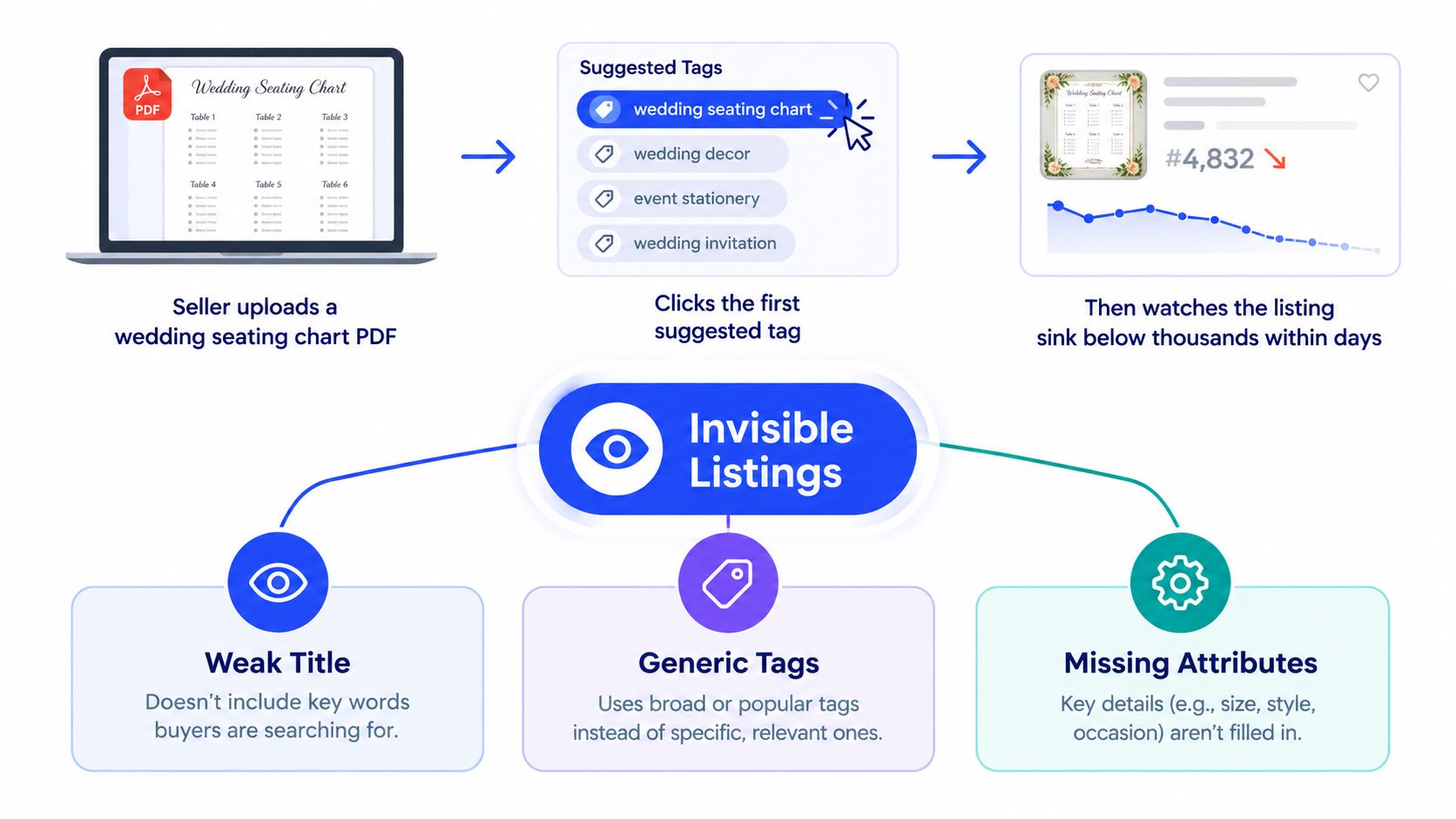
I see the same pattern across printable planners, wall art, invitation templates, and business forms. Sellers describe the product in broad marketplace terms instead of buyer terms. They write titles for coverage, not for intent. Etsy then tests the listing against mixed searches, shoppers skip it, and the listing loses momentum.
Etsy's search system weighs relevance along with listing and shop performance signals. For digital products, the practical takeaway is simple. Buyers are not waiting on shipping details first. They are checking whether the file fits their exact use case, style, format, and deadline. Etsy's digital listing help also distinguishes between instant downloads and made-to-order downloads, which matters because shoppers often filter for speed and access, not just design.
Visibility usually breaks in four places:
Intent mismatch: The listing targets broad traffic like “wedding template” instead of a buyer-ready phrase like “editable wedding seating chart poster.”
Field overlap without coverage: The title, tags, category, and attributes repeat the same few words instead of covering adjacent modifiers such as size, style, audience, or file type.
Weak click signals: The thumbnail and first line of copy do not confirm what the buyer gets fast enough.
Late timing: Seasonal products go live after demand has already peaked.
The trade-off is straightforward. Broader phrases can bring more impressions, but digital downloads usually rank better and convert better when the phrase matches a narrow need. A buyer searching “minimalist baby shower game bundle printable” is far closer to purchase than someone typing “baby shower.”
That is why I treat Etsy SEO for digital downloads as a matching problem first. Keyword placement still matters. Stuffing broad terms into every field does not. The listing needs to align with how a ready-to-buy shopper searches, clicks, and decides within seconds.
If you want a quick refresher on the mechanics behind that process, this guide on what Etsy SEO is gives the basic framework.
Invisible listings rarely need a new product. They need tighter intent signals, cleaner field choices, and a listing setup that helps Etsy test them against the right searches.
Building a Keyword List That Matches Buyer Intent
A buyer searching for a digital download rarely starts with the broadest possible word. They search the problem they need solved. On Etsy, that usually means the winning phrase is not “wall art” or “planner.” It is something closer to “neutral nursery wall art set of 3 printable” or “editable budget planner spreadsheet for couples.”
That difference matters because Etsy SEO for digital downloads is a matching job. The listing has to line up with the buyer's use case, style, audience, and format. Broad phrases can pull in more searches, but they also mix shoppers who are browsing with shoppers who are ready to buy. For most digital products, I would rather rank for the second group.
A practical way to build that list is to start with a small set of seed phrases, then expand only into terms that show clear purchase intent. The workflow outlined in this digital download keyword research guide is sound. Start with a handful of buyer-led phrases, check Etsy autocomplete, review top-ranking listings for recurring wording patterns, then verify whether the phrase is worth targeting with an Etsy-focused tool.
Build phrases around buyer-intent components
I use a simple formula:
audience or occasion + product type + style or feature + format
For example:
bride to be + invitation + minimalist + editable template
teacher + classroom decor + boho + printable
parent + chore chart + visual + instant download
That structure gives you phrases a real buyer might type, not a pile of disconnected keywords. It also helps you find gaps. If every competitor targets the product type and style but skips the format, adding “editable Canva template” or “printable PDF” can put you closer to the actual search.
A research flow that holds up in practice
For a wedding product, the starting phrase might be wedding seating chart. That is only a starting point.
Use the phrase to find stronger versions:
Check Etsy autocomplete and write down the modifiers Etsy keeps surfacing.
Review the top organic listings and note repeated patterns, not exact titles.
Sort phrases by buyer signals such as occasion, style, size, audience, or file type.
Validate the shortlist with eRank or Marmalead.
Drop phrases that are vague, crowded, or a weak fit for the actual product.
Copying a competitor title word for word is lazy SEO. It can get you closer to relevance, but it rarely gives you a clean position in search.
Worked example
A weak target looks like this:
wedding seating chart printable
Stronger targets look like this:
wedding seating chart editable template
blush boho wedding seating sign printable
printable wedding seating chart template for tables
Each phrase adds intent. “Editable template” signals customization. “Blush boho” signals style. “For tables” signals a specific use case.
Phrase | Buyer Intent Signal | Why it works |
|---|---|---|
wedding seating chart | Medium | Clear product, weak format and feature detail |
wedding seating chart printable | Medium | Better, but still broad |
wedding seating chart editable template | High | Strong purchase intent and clear format |
blush boho wedding seating sign printable | High | Adds style and product clarity |
printable wedding seating chart template for tables | High | Narrow use case, better buyer match |
wedding sign | Low | Too broad to rank or convert well |
Filter hard before a phrase makes the list
A phrase earns a spot if it clears three checks:
Exact fit: It describes the product the buyer will receive.
Competitive range: A smaller or newer shop has a realistic chance to compete.
Purchase intent: It sounds like a shopper choosing a product, not exploring ideas.
One extra filter matters for digital downloads. Include phrases that reflect delivery format or editability only if the product matches. I see sellers force “editable,” “Canva,” or “template” into listings for products that are plain printables. That can get clicks, but it also creates disappointment and hurts conversion.
A focused keyword list is usually stronger than a huge spreadsheet. For most Etsy digital downloads, a short list of tightly matched phrases gives better direction than chasing every variation that appears in autocomplete.
Writing Titles Tags and Attributes That Work Together
A buyer searches "editable wedding seating chart template" and lands on a listing titled "Wedding Printable Sign Template PDF Download." The product might fit, but the listing is speaking in fragments while the buyer is searching in phrases. That mismatch is why many digital downloads get impressions without clicks, or clicks without sales.
On Etsy, titles, tags, categories, and attributes work best when they all describe the same product from slightly different angles. The goal is not to cram in more keywords. The goal is to match the way a ready-to-buy shopper narrows the search. Product type first. Then format. Then style, occasion, or use case.
Build the title around one buying phrase
Start with the phrase that best matches purchase intent, not the broadest term with the highest search volume. For a wedding seating chart, that usually means leading with the exact product and format.
Wedding Seating Chart Editable Template, Blush Boho Seating Sign Printable, Editable PDF
That title works because it handles three jobs in order:
Leads with the phrase a buyer is likely to search close to purchase
Adds style and secondary use-case language
Clarifies delivery format without wasting the opening words
I usually map one primary phrase to the title, then spread close variations across tags and attributes. That keeps the listing readable and gives Etsy more valid ways to match the product. If the title starts chasing every variation, click-through rate usually suffers.
Before and after field mapping
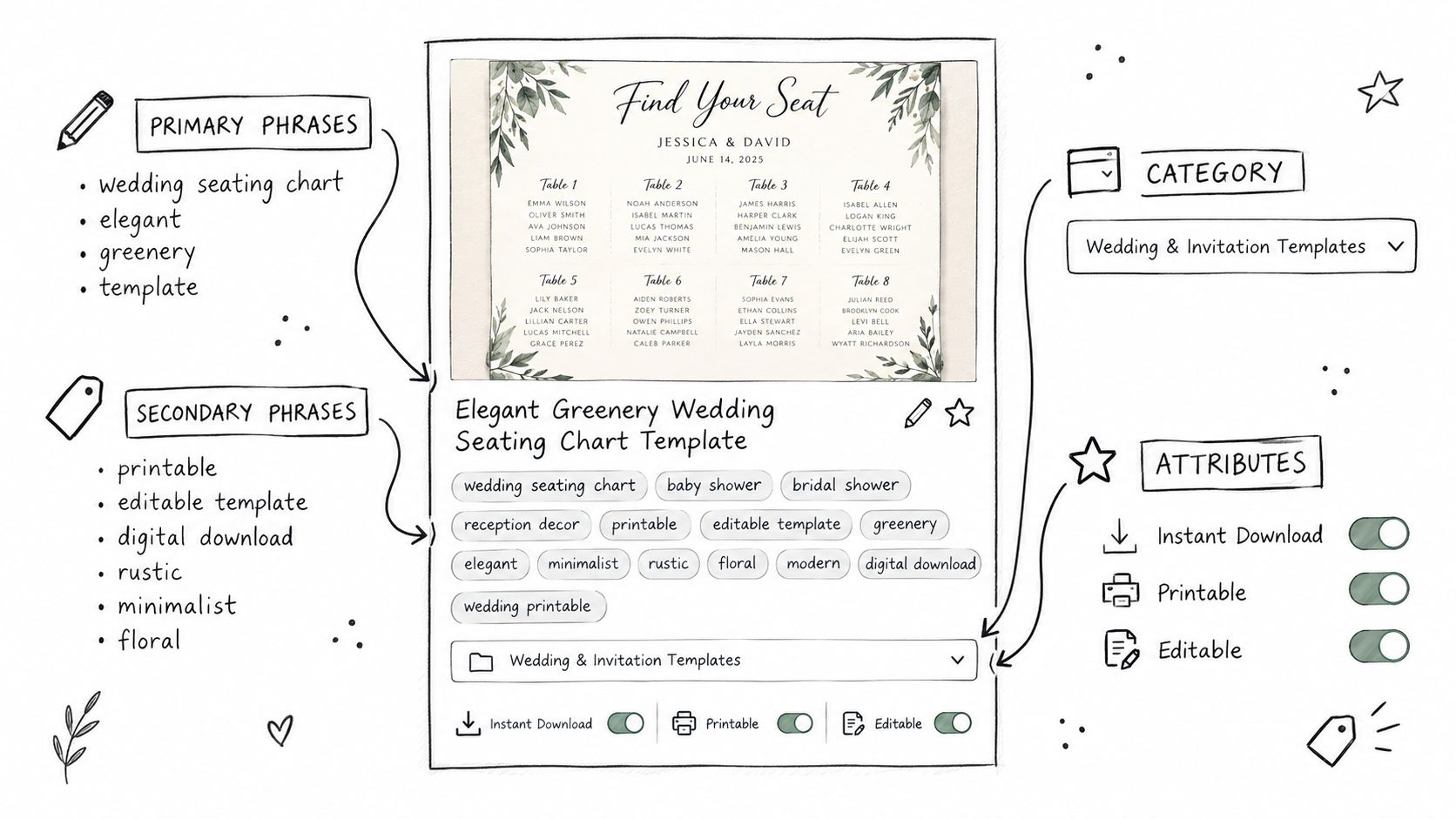
Before
Title: Wedding Printable Sign Template PDF Download
Tags: wedding, printable, sign, seating, wedding sign, chart, editable, template, decor
Attributes: partly filled, partly ignored
After
Title: Wedding Seating Chart Editable Template, Blush Boho Seating Sign Printable, Editable PDF
Category: wedding template or seating chart equivalent
Tags: distinct phrase variations instead of repeated single words
Attributes: completed to reinforce format, occasion, and style
The improvement comes from coordination. Etsy can combine signals across fields, so every field should add context the others do not fully cover.
Tag for intent coverage, not word repetition
A common mistake is burning tag space on slight rewrites of the same root word. For digital downloads, that usually looks like "wedding sign," "wedding printable," "wedding chart," and "wedding template" in the same listing. Those tags feel different to the seller, but they often cluster around the same broad idea and leave high-intent modifiers uncovered.
Use tags to capture how buyers refine the product:
editable seating chart
printable seating template
boho wedding sign
blush wedding printable
seating chart for tables
That last tag matters because use case changes intent. "For tables" signals a buyer who already knows where and how the template will be used.
Attributes are often underused here. If Etsy gives you fields for occasion, recipient, style, holiday, room, or format, fill the relevant ones. Attributes help the listing qualify for filtered searches and support the phrase signals in your tags. They are also one of the cleanest ways to add specificity without stuffing the title.
If you want more examples of field-level cleanup, these Etsy listing tips are useful for spotting wasted space.
A simple mapping formula
Use this structure for most digital downloads:
Title: exact product plus strongest buyer-intent phrase
Tags: close variants, use cases, style modifiers, audience modifiers
Attributes: format, occasion, style, recipient, holiday, or other relevant Etsy fields
For seasonal products, I also decide where the seasonal modifier belongs. If "Christmas gift tag printable" is the core product, season belongs in the title. If the item sells year-round and only has a holiday variation, save that modifier for tags or a separate listing version closer to the season.
Quick audit checklist
Opening words: Does the title start with the product a buyer wants to purchase?
Tag spread: Do the tags cover different phrase angles instead of repeating the same root words?
Attribute depth: Are the relevant fields completed, especially format, style, and occasion?
Intent match: Does every phrase describe what the buyer will receive?
Strong Etsy SEO for digital downloads usually looks plain when you break it down. Clear title. Distinct tags. Relevant attributes. Every field pushing toward the same buyer intent.
Turning Browsers into Buyers With Previews and Copy
A buyer searches "editable wedding seating chart template," clicks your listing, and decides within seconds whether it matches the job they need done. That decision is not only about design quality. It is about intent match.
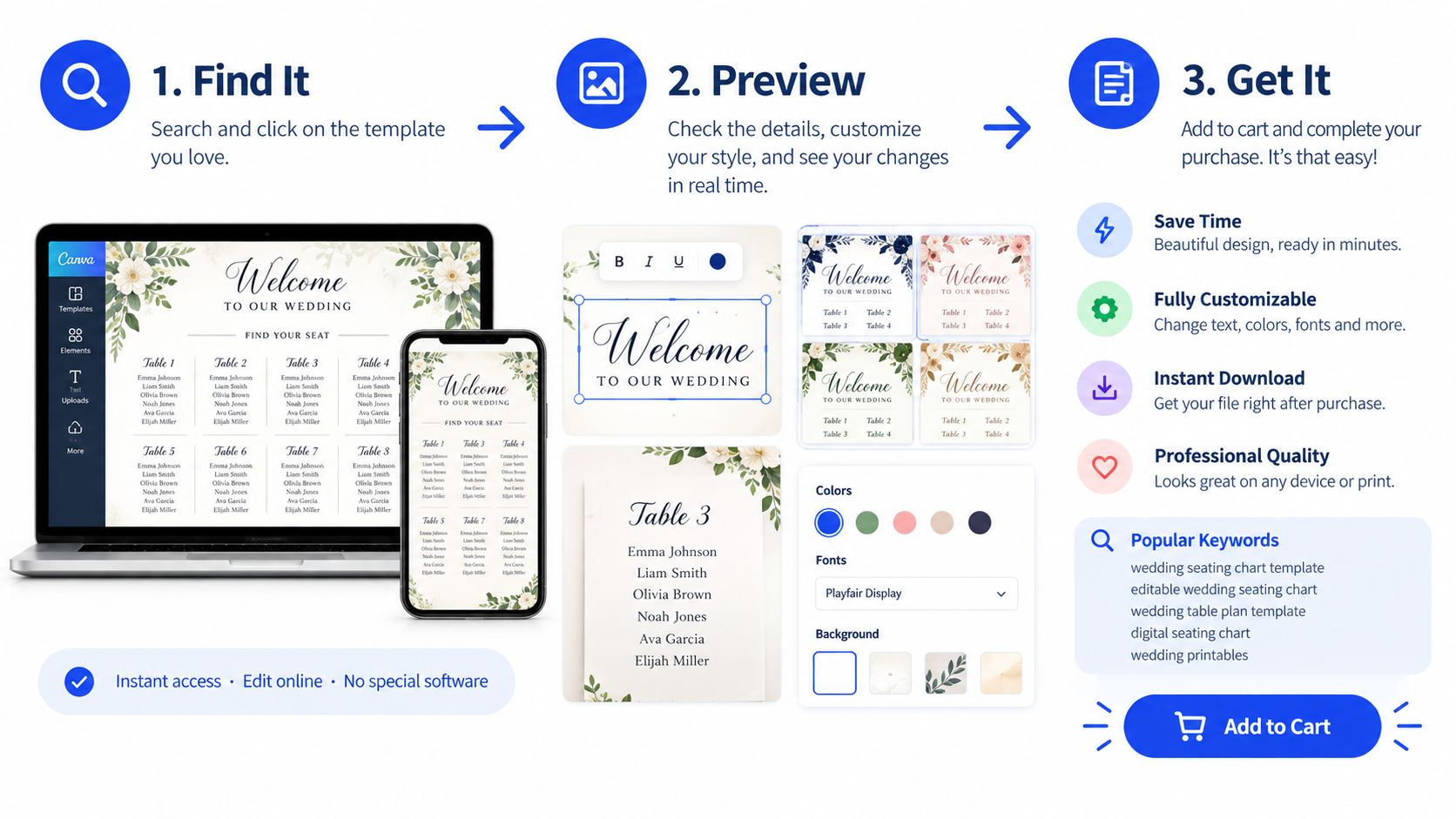
For a wedding seating chart listing, the first image should show the template in the situation the buyer has in mind. Use a polished mockup that shows the seating chart at a reception setup or on the device where the buyer expects to edit it. A plain flat export leaves too many questions unanswered, especially for shoppers comparing several similar digital downloads.
What the first three image slots should do
The first image gets the click. The next two should remove the doubt that stops the sale.
Image one: Show the finished result in a styled mockup that matches the search intent.
Image two: Show the editable areas or layout detail so buyers can judge usability fast.
Image three: Show what is included. Sizes, file types, delivery format, or device compatibility.
This matters more for digital downloads than for physical products because buyers cannot inspect the product in person. If your previews do not confirm "yes, this is the exact kind of file I need," shoppers bounce, and Etsy gets another signal that the listing did not satisfy that search.
I treat image text as part of SEO support, not just design. If the target phrase is "editable classroom sign template," the preview should confirm editable, classroom use, and template format without forcing the buyer to read the full description. That is how you carry buyer intent from search results into the listing itself.
Description copy should remove friction before it sells
Good description copy answers purchase questions in the first few lines. It should tell the buyer exactly what they receive, what they need to use it, and where the limits are.
Start with:
what the buyer receives
whether it's an instant download
file format
editing software or platform needed
size options
limits on customization
refund boundaries for digital files
I also recommend mirroring the long-tail phrase logic from your keyword research in natural language. A shopper who searched "printable bachelorette scavenger hunt game" wants quick confirmation that the file is printable, that it is a game, and that it fits a bachelorette party. If the opening copy wanders into brand story first, you lose the moment.
Etsy explains that recent customer experience factors such as review rating, message response rate, and case history can affect visibility, and it also points sellers toward clear information and strong images as part of search performance (Etsy seller handbook on search visibility).
Buyers can't touch a digital product before purchase. Your previews and copy have to do that job for them.
Use reviews to answer objections
Reviews are useful because they reveal which doubts buyers had before they purchased. If buyers mention that editing was easy, printing worked well, or the download came instantly, turn those points into image overlays, FAQ language, or tighter opening copy.
This is one of the simplest conversion gains on Etsy. You are not adding more keywords. You are matching the listing to the concerns behind the keyword. That is the difference between traffic and sales.
Seasonal Timing Tactics for Digital Download Launches
A seller uploads a Christmas party game on December 10, adds broad tags like "holiday printable," and waits. The listing is live during the season, but it still misses the buying window. Seasonal Etsy SEO works best when the listing is indexed, tested, and collecting engagement before buyers surge in.
For digital downloads, timing is an intent-matching problem. Shoppers do not all search at the same moment, and they do not all use the same phrasing at each stage. Early buyers search broad planning terms. Closer to the date, searches get narrower and more urgent, like "last minute teacher gift tag printable" or "editable graduation invitation template instant download." If your listing only appears after that shift starts, you are late.
Treat each product type differently
Different products have different search curves.
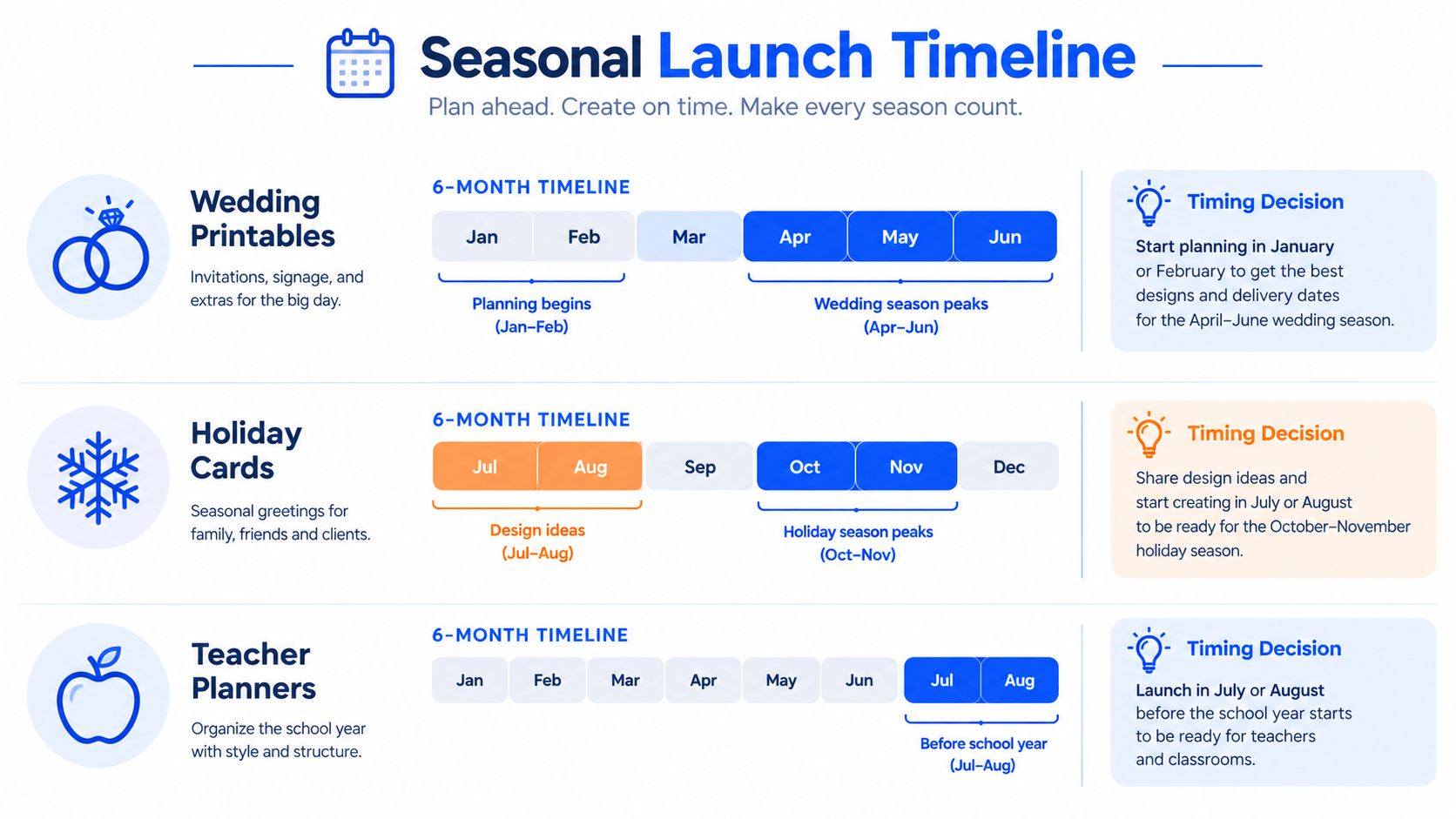
Wedding printables: Launch ahead of proposal season, engagement season, or the venue-booking phase. Buyers often search by event type first, then by item type later.
Planners and calendars: Publish before the date change. Traffic usually builds while buyers are still organizing the next month, quarter, or year.
Holiday templates: Get them live while shoppers are planning events, gifts, or classroom activities. Once the holiday week arrives, many buyers have already chosen.
I usually separate the keyword structure into two layers. The first layer is the evergreen buyer-intent phrase, such as "editable wedding welcome sign template." The second layer is the seasonal modifier, such as "spring wedding" or "boho summer wedding." That keeps the listing searchable outside peak season while still giving it a reason to win seasonal clicks.
Match the phrase to the buying window
This is the part many Etsy guides skip. Seasonal timing is not just about the month you publish. It is also about when each phrase becomes the right phrase.
A few practical examples:
Early-window phrase: "teacher appreciation gift printable"
Mid-window phrase: "teacher appreciation week candy bar wrapper printable"
Late-window phrase: "last minute teacher gift tag printable"
Those are different searches from buyers with different urgency. The later the season gets, the more specific the phrasing usually becomes. Titles, tags, and image text should reflect that shift without rewriting the whole listing every few days.
Refresh without wiping out what already works
Do not rebuild a listing from scratch every season unless the original targeting was wrong. Keep the proven core. Update the seasonal layer.
That usually means:
adjusting the lead image to match the current event or year
swapping in a timely long-tail phrase where it fits naturally
revising a few tags to reflect near-term demand
renewing only when the listing already has a solid intent match
As noted earlier, Etsy gives new listings and renewed listings some temporary visibility help. In practice, that boost helps most when the listing is already pointed at a phrase buyers are about to search.
Sellers who publish early enough to match the next wave of buyer intent usually outperform sellers who react after the demand spike is obvious.
A good seasonal launch calendar is simple. Publish early, target the phrase buyers will use next, and keep your evergreen keyword base intact so the listing does not go dead the moment the season passes.
DIY Optimization Versus a Focused Ranking Campaign
Some sellers should handle optimization themselves. Others shouldn't.
If your catalog is small, your product is still being tested, and you want to learn how your niche behaves, DIY is often the right path. You keep full control over titles, previews, and revision cycles. You also build the skill to repeat the process across future listings.
If your product already converts and you need visibility inside a narrow selling window, a focused ranking campaign can make more sense. In that case, you're not outsourcing your whole shop. You're narrowing the goal to one listing and one phrase.
Where DIY makes sense
DIY is usually the better fit when:
You can test patiently: You're willing to revise phrasing, images, and attributes over several weeks.
Your shop is still finding product-market fit: You don't yet know which design or angle deserves concentrated effort.
You want long-term control: You'd rather understand the mechanics than delegate them.
When a focused campaign is a better tool
A campaign is more practical when:
The product is proven: The listing gets saves, clicks, or sales, but not enough visibility.
Timing matters: You need traction during a launch or seasonal window.
You want outside pressure-testing: Another specialist can challenge weak keyword choices and narrow the target.
One option in that category is Upglider, which runs focused Etsy ranking campaigns for one listing and one agreed search phrase of three or more words, with a top-15 ranking objective and no Etsy account access required.
Factor | DIY Optimization | Focused Ranking Campaign |
|---|---|---|
Timeline | Slower, depends on your testing rhythm | Better for time-bound visibility goals |
Cost | Lower direct cost, higher time cost | Higher upfront cost, lower personal time load |
Learning curve | High, especially on phrase selection | Lower if you want execution help |
Control | Full control over every edit | You keep listing ownership, but strategy is narrower |
Best use case | Small catalog, skill-building, early testing | Proven listing, seasonal window, concentrated push |
Questions to ask before hiring anyone
Digital download experience: Have they worked on printables, templates, or other file-based Etsy listings?
Reporting cadence: Will you see ranking progress clearly?
Scope of edits: Are on-page recommendations or changes included?
Ownership: Do you keep control of the listing after the engagement ends?
The right choice depends less on shop size than on urgency and confidence. If you already know the listing deserves traffic, speed starts to matter.
Your First Week Checklist and Common Myths to Skip
Three myths keep digital download sellers stuck.
The first is that all 13 tags should be stuffed with the biggest head terms available. The second is that constant renewing is a strategy by itself. The third is that one attractive image can carry a listing.
None of those holds up.
Myth one and what to do instead
Myth: Broad, high-volume head terms in every tag help more.
Reality: Broad terms often bring weak intent. Current guidance around digital product SEO points toward buyer-intent matching, conversion, and sales velocity, with coverage noting a shift away from raw keyword density and toward semantic meaning and historical engagement (2026 Etsy digital product SEO guide).
Use smaller viable phrases that combine use case, style, and format.
Myth two and myth three
Myth: Renewing a listing every week is the growth plan.
Reality: Timing matters, but renewal alone doesn't fix poor matching or weak conversion. It only helps when the listing is already positioned to capture the right shopper.
Myth: One great image is enough.
Reality: Buyers need a sequence. One image may win the click, but supporting previews and friction-reducing copy close the sale.
One clean long-tail phrase is worth more than a pile of broad tags that attract the wrong shopper.
Your first seven days
Use one listing. Don't try to overhaul the whole shop at once.
Day 1: Pull fresh keyword ideas from Etsy autocomplete and competitor pattern mining.
Day 2: Cut generic phrases and rebuild a shortlist around buyer intent.
Day 3: Rewrite the title so the primary phrase appears early and reads naturally.
Day 4: Replace duplicated tags with distinct phrase variations.
Day 5: Complete missing attributes and tighten category choice.
Day 6: Swap the weakest preview image for one that explains the product faster.
Day 7: Mark the listing for its next seasonal refresh window.
If you're still building traction from scratch, this guide on Etsy SEO for new sellers and first listings is a useful companion.
The first action to take today is simple. Open the listing with the most impressions and the weakest click-through behavior. Rewrite the title around one long-tail buyer phrase, then watch what happens over the next fourteen days.